






About Color Tunnel
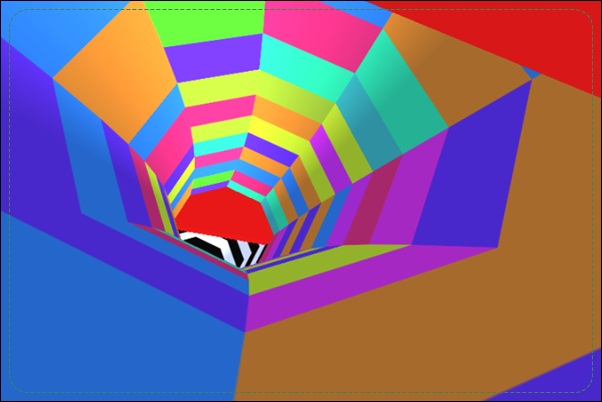
Color Tunnel surrounds a forward-moving viewpoint with bright patterns and red barriers. You move left or right around the tunnel to find a clear passage while the scenery rushes toward you. The visual variety can make the scene feel busy, but the useful information is specific: where the red obstacle is, and which part of the tunnel remains open.
As the pace builds, a barrier occupies more of the view before you have finished responding. Early route selection is therefore more useful than dramatic late movement. Locate an open sector, move into it, and begin reading the following obstacle instead of continuing to rotate after the immediate danger has been cleared.
How to Play Color Tunnel
Use Left and Right Arrow or A and D to move around the tunnel. Avoid red obstacles, follow clear openings, and keep the forward run alive as the course becomes harder to read at speed.
- Identify the first red barrier and the open sector beside it.
- Move left or right to put that opening on your route.
- Stop extending the correction once you have enough clearance.
- Read the next barrier and repeat until a collision ends the attempt.
Controls & Timing
Colorful walls and red barriers differ
The tunnel’s changing appearance can attract attention without requiring a dodge. Use the dangerous red shapes to decide where movement is needed. Separating decoration from collision space keeps the route easier to understand.
Rotation needs an endpoint
Moving around the tunnel is useful only until it produces a clear passage. Continuing the same input can carry you away from that opening. Pick the sector you want to use and recognize when the correction has achieved it.
Controls
| Input | Action | When to use |
|---|---|---|
| Left Arrow / A | Move left around the tunnel | Reach a clear sector |
| Right Arrow / D | Move right around the tunnel | Reach a clear sector |
High Score Tips
- Choose the opening while it is distant. A barrier is easier to reason about before it fills the screen. Locate the free sector early so the later movement is an execution of a known route.
- Avoid reacting to background changes. Keep the dangerous red geometry separate from the colorful wall pattern. Turning because the scene looks different can waste a correction when your current sector is still clear.
- Use only the movement the gap needs. A large sweep may pass through one opening and continue into another hazard. Finish the adjustment when clearance is established, then reassess the next obstacle.
- Keep the following barrier in view. As the nearest obstacle passes, move attention farther down the tunnel. This reduces the pause that otherwise leaves the next shape looking unexpectedly close.
Key Features
- Forward tunnel viewpoint. Approaching barriers must be read through a moving three-dimensional scene.
- Red collision obstacles. Hazard color helps separate dangerous shapes from the background.
- Left-right tunnel movement. Two directions let you select a clear sector.
- Increasing pace. Longer survival demands earlier decisions about the route.
Frequently Asked Questions
Do all colors indicate an obstacle?
No. The vivid tunnel pattern is part of the scene, while red barriers define the collision threats described here. Read the solid red geometry before deciding to change position.
Can I jump over a barrier?
The documented controls move left and right around the tunnel. Look for an open sector and navigate into it, rather than relying on a separate jump command.
Why can a large dodge still end in a crash?
It may continue after the first obstacle is cleared and carry your route out of the safe sector. Stop extending a correction once it has created enough clearance.
What should I watch as the speed increases?
Look farther down the tunnel for the next opening. Earlier recognition gives you time to choose a route, even when the final approach leaves only a short window for movement.
Should I change direction at every new barrier?
Only when the current sector is blocked or leads into trouble afterward. A visible obstacle does not automatically require an input if your existing route already passes through its opening.